Before start
When diving to a new location, please be sure to press "+" on the time page until the display says "QNH OK" with an alert sound, which means the sea level pressure has been recorded successfully.
(If the display says "QNH fail", please modify "sensor offset"). Also, please be sure to check the diving mode, water type and the power supply. Press "+" to switch the diving mode,
long Press "-" to switch between "fresh water" and "sea water".
Menu -》Other Settings-》Sensor offset
~~~~~~~~~~~~~~~~~~~~~~~~~~~~~~~~~~~~~
Application of Diving Algorithm
The diving computer table adopts the ZHL16-C algorithm, which includes 16 organizations
and defaults to the PADI mode. Its No Decompression Limit is close to the official diving schedule data of PADI (but slightly more conservative),
expecially at a depth of about 30 meters.
Note: This parameter is only recommended for PADI fun dive and should be avoided from approaching the No Decompression Limit too closely.
For other advanced diving, please make sure to modify the appropriate diving GF parameters as needed.
Menu-》diving set-》scuba gf
PADI:use the PADI mode L/H:use gf parameters
L:deep water parameter H:shallow water parameter
Smaller parameters have more conservative No Decompression Limit.
The algorithm will provide a No Decompression Limit time before jump into decompression diving,
and if go deeper , more shorter the time is.
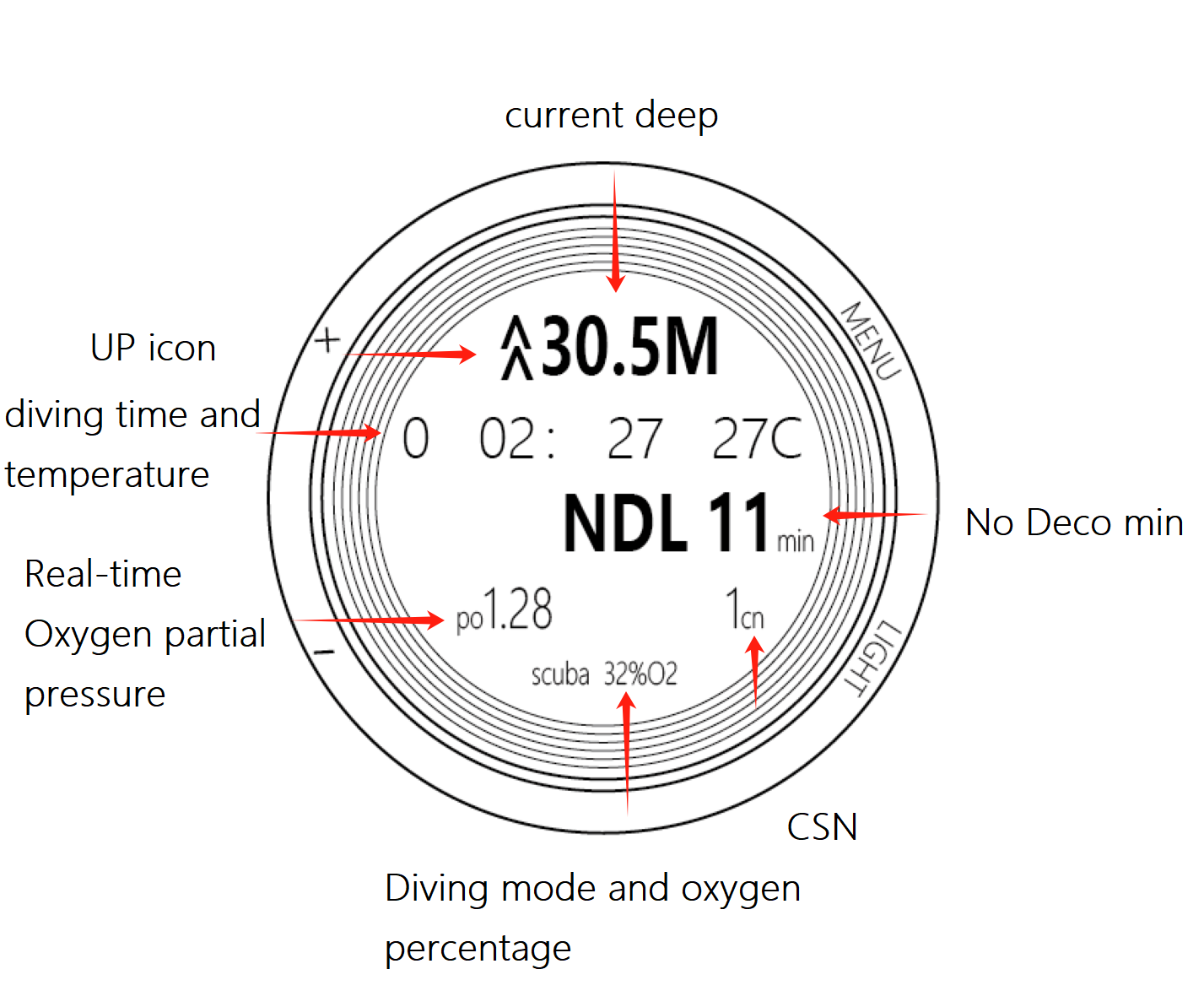
After accidentally entering the decompression dive, there is no need to be nervous.
The watch will display a "minimum decompression depth" and a decompression completion time.
If no time is displayed, it indicates that decompression cannot be completed at this depth.
Consider slowly ascending to bring the depth closer to the minimum decompression depth.
As the diving time and depth increase, the "minimum decompression depth" will continue to add up.
the time for decompression will shorter when the diver approaches the "minimum decompression depth", but also will increased the risk. Never decompress above this depth.
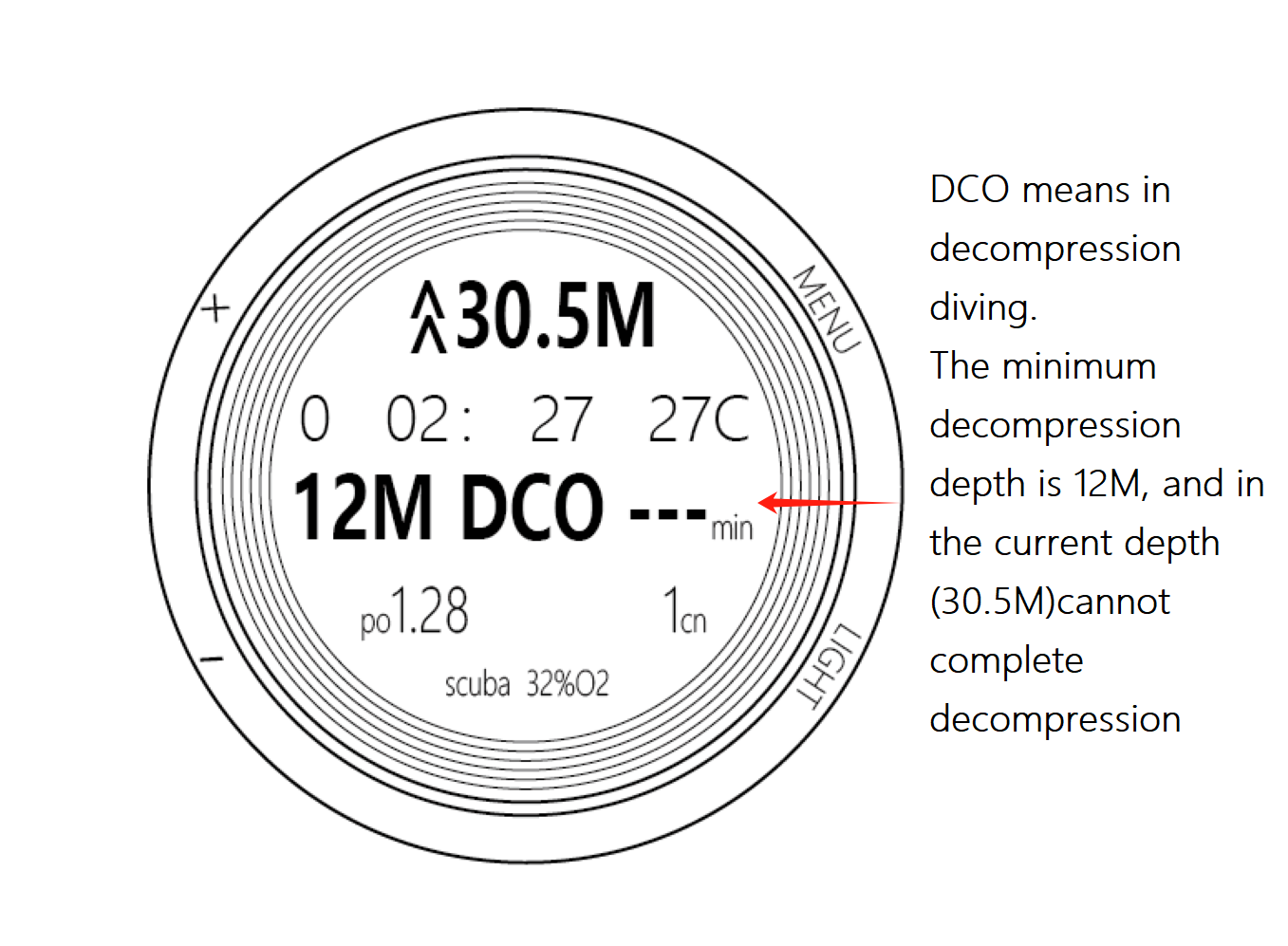
In extreme cases, you may not be able to complete decompression at the "minimum decompression depth".
At that time, you need to perform multi-stage decompression.
Please keep 2-3 meters below the "minimum decompression depth" and wait for the "minimum decompression depth" to rise
to a suitable location before continuing to ascend for a second or even third decompression.
Do not enter this state in fun diving, as the air may not be sufficient and you don't have to much time.
The computerized scuba diving watch will continuously track the amount of residual nitrogen in the body for two days,
and the amount of residual nitrogen in the body will return to its initial value if no scuba diving is performed for 48 hours.
After scuba dive, the watch will display the time required for the nitrogen content in the body to
decrease to near normal state at the surface in minutes (short press "-" on the time page to switch).
It will also provide the current rest time for divers to refer to during surface rest.
For high-altitude diving, please press"+" on the time page to record the water level pressure. After recorded, you can dive at high altitude.
High-altitude diving calculating will compensate the actual depth to the equivalent depth based on the recorded pressure.
The time of NDL will be shortened.
~~~~~~~~~~~~~~~~~~~~~~~~~~~~~~~~~~~~~
Other restrictions for security
When the ascent speed is greater than or equal to "12 m/min", a "SPD [STOP]" sign will be prompted:
it will monitor the speed once every 2 seconds, and if the instantaneous speed of the hand moving exceeds this value during
operation, no prompt will be given.
If the ascent speed exceeds 5.4 meters within 18 seconds, the "MSPD [DOWN]" will be displayed.
After the dive is completed, an additional "Diving Prohibited" icon will be displayed for 24 hours.
If the ascent is too fast from a depth of less than 7 meters, this icon will not be displayed.
When diving deeper than 30 meters or 35 meters, a warning will be given.
In the PADI fun dive mode, a continuous warning will be given when diving deeper than 40 meters.
It is not recommended to dive deeper than 40 meters. After modifying the diving parameters, there will be no warning at 40 meters.
Scuba diving has two additional depth reminders that can be set by the user.
This watch has two adjustable depth decompression functions, which are turned off by default and can only be manually activated.
The adjustment ranges are 12-25 meters and 27-50 meters respectively, and the time range is 2-30 minutes.
After activation, it will only trigger when the maximum diving depth is greater than the set decompression depth +10 meters.
For example, if the maximum diving depth is less than 30 meters, setting a decompression depth of 20 meters will not trigger.
Please be aware of this when planning your dive.
In addition, the timing of deep decompression will pause when leaving this depth and continue when re-entering it.
If you drift of the decompression depth +5 meters, the timing will be reset and you will need to decompress again.
This table contains a 5-meter 3-minutes decompression procedure, which is a mandatory option and cannot be edited.
It will only be triggered when the maximum diving depth is greater than 10 meters, otherwise it will not be triggered.
This decompression procedure follows the PADI rules, requiring a 5-meter decompression for 8 minutes when diver entry into decompression diving,
and a 5-meter decompression for 15 minutes when diver entry into decompression diving over 5 minutes
After scuba dive, the "No Flight" icon will be displayed for 24 hours.
~~~~~~~~~~~~~~~~~~~~~~~~~~~~~~~~~~~~~
NITROX Diving
The NITROX Diving can set the mixing ratio at will within a certain range,
or quickly switch diving modes by short-pressing the"+" button on the time page.
Menu -》Diving Set -》NITROX
In addition to tracking nitrogen in the body, the NITROX mode also calculates the oxygen pressure and controls the maximum depth.
The maximum oxygen pressure can be manually set. default value is 1.4.
Menu-》Diving Set-》MAX PO2。
The NITROX Dive mode also calculates the percentage of CNS, and will give a prompt when the CNS reaches 90%.
~~~~~~~~~~~~~~~~~~~~~~~~~~~~~~~~~~~~~
All reminders and warnings
reminders:1 second sound or vibration
[ OK [UP]]:Notice of decompression completion
[SPD [STOP]]:The up speed is greater than or equal to "12 m/mins"
NDL---》DCO ---:Enter the decompression diving mode
[CNS90 [UP]]:Oxygen intoxication notification
No display: deep notification
No display: notification of reaching the decompression depth
warnings:2 second sound or vibration
[MXDP [UP]]:PADI 40m Maximum Depth Warning
[MXPO2[UP]]:Maximum PO2 warning
[TOP [DOWN]]:Less than the "minimum decompression depth" warning
critical warning:4 second sound or vibration
[MSPD[DOWN]]:The ascent speed exceeds 18m/min
~~~~~~~~~~~~~~~~~~~~~~~~~~~~~~~~~~~~~
Attention
Please do not use it for diving at water temperatures of 0 degrees or below.
Please do not use it for one dive that lasts more than 18 hours, as the data content may overflow.
The maximum dive time can displayed is 10 hours.
This computer watch only provides a reference data for your safe diving.
Please do not use it as the only reference. Please make a diving plan in advance.
Our diving computer watch products cannot provide any legal guarantee for your diving safety.
