1. Quick start guide
Warning:
Do not leave the watch idle for more than one month without recharging, as
this may cause damage to the battery due to over discharge. If damaged, it
needs to be returned to the manufacturer for battery replacement.
If long-term storage is required, first fully charge the battery, then put it in a safe
place and it is recommended to recharge it 3 months later.
Please do not use it for one dive that lasts more than 18 hours, as the data
content and storage space may overflow. The maximum time displayed for diving
is 10 hours.
This watch only provides a reference data for your safe diving, please do not
use it as the only reference, please make a reasonable diving plan in advance.
Our diving computer products cannot provide any legal guarantee for your diving
safety.
Basic information display:
Operational logic:
Before Starting Diving:
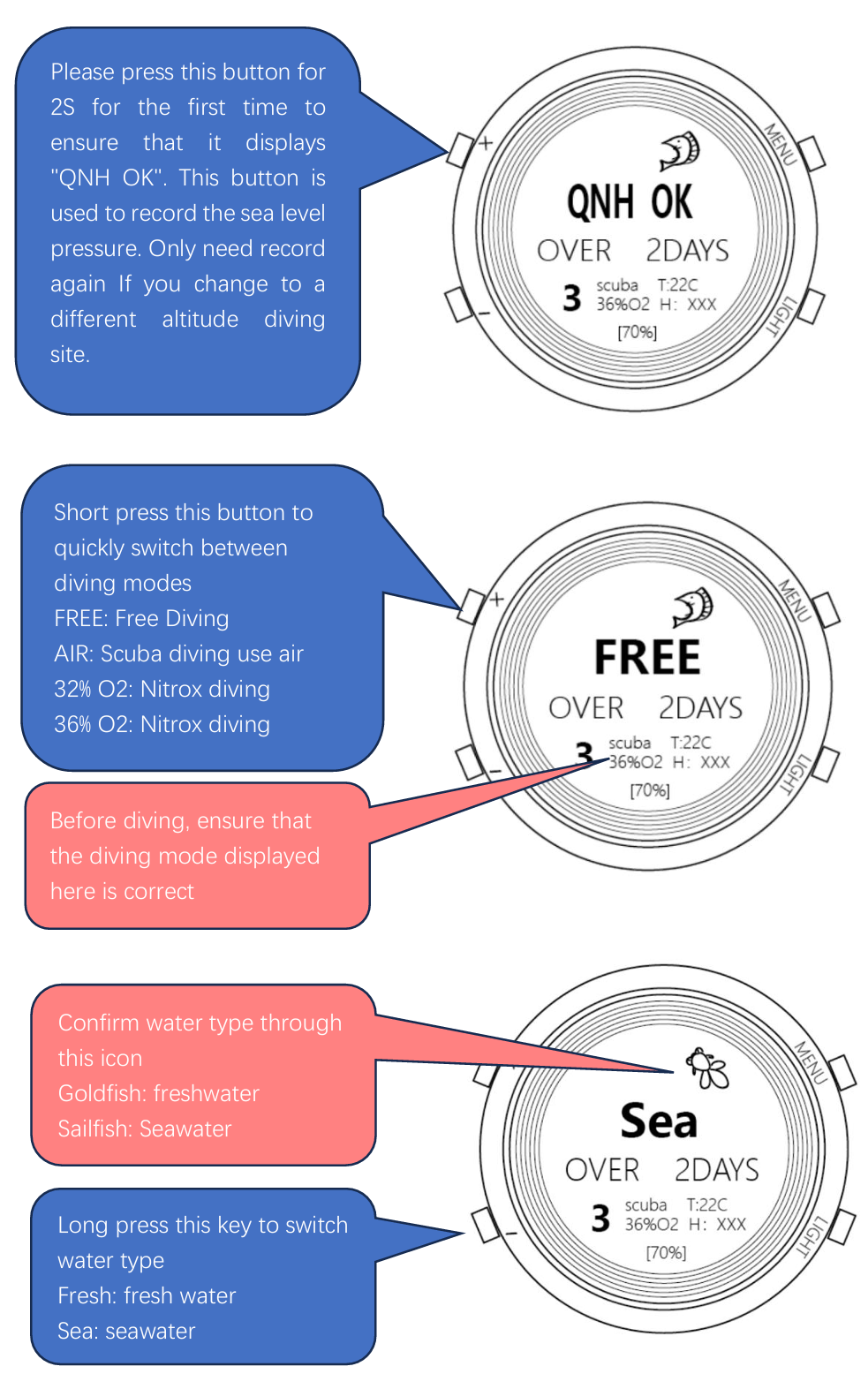
Before diving, it is necessary to repeatedly confirm three things:
whether the sea level pressure has been recorded, the diving mode, and water type.
free diving interface:
Scuba Diving Interface:
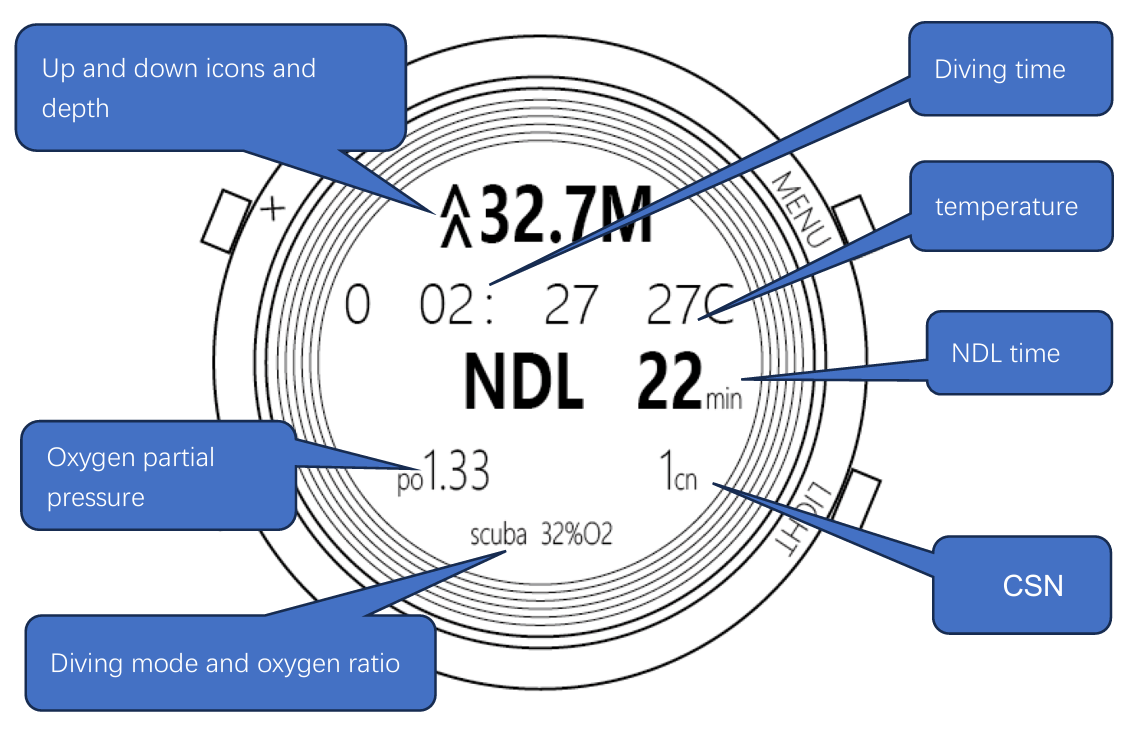
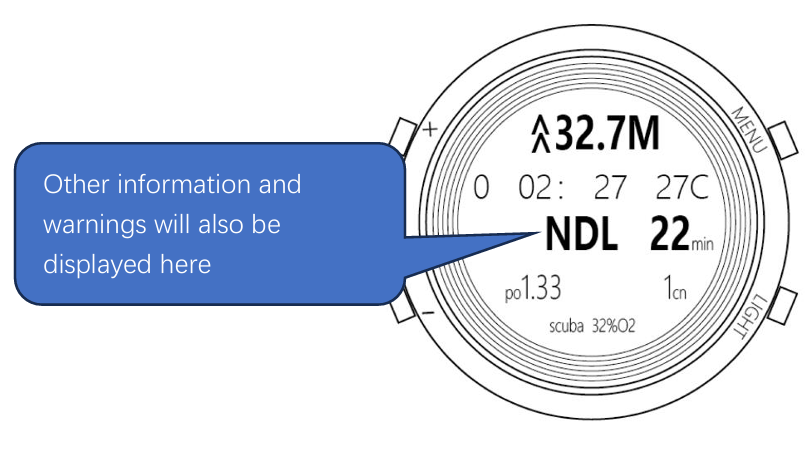
~~~~~~Display information~~~~~
"NDL 11min":There are 11 minutes left for no decompression dive.
"2M DCO 22min": The current minimum decompression depth is 2 meters, and
22 is the remaining decompression time, indicating that after decompression at
the current depth for 22 minutes diver can slowly rise to the surface.
"3M DCO ---min": The current minimum decompression depth is 3 meters. At this
depth, the remaining decompression time is too long to decompress, and it may
be necessary to raise the water level appropriately.
Note: The 3M here means that it cannot rise above 3 meters at present, but the
closer it gets to 3 meters, the less time it takes to decompress, but the risk of
decompression sickness also increases accordingly. If you want to ascend at this
time, it is recommended to check the remaining decompression time
during the slow ascent process. When the time reaches to a suitable position,
stop and start decompression. If the ascent is too slow, the ascent process will
also be considered as a decompression process, and it may be possible to
complete decompression during this process. After completing decompression,
the display will return to "NDL 1min", indicating a decompression-free time.
"[[01:06]]":"5 m for 3 minutes", with 1 minute and 6 seconds remaining.
"OK [UP]": "5 m for 3 minutes" has been completed, and can raise to the surface.
~~~~~Warning message~~~~~
"SPD [STOP]":When the ascent speed exceeds 12 meters per minute, it is
necessary to stop the ascent.
"MSPD[DOWN]":When the depth is greater than 7 meters and the ascent speed
exceeds 18 meters per minute, it is necessary to immediately stop the ascent and
reduce the depth appropriately.
"MXDP [UP]":Maximum depth of 40 m for fun dive, requiring ascent.
"TOP [DOWN]":When ascending to a depth above the minimum decompression
depth during decompression diving, it is necessary to immediately increase the
depth.
"MXPO2[UP]":Upon reaching the set maximum oxygen partial pressure depth,
need immediately rise.
"CNS90 [UP]":In NITROX diving inhaled too much oxygen, CSN has reached
90%, recommended to ascend.
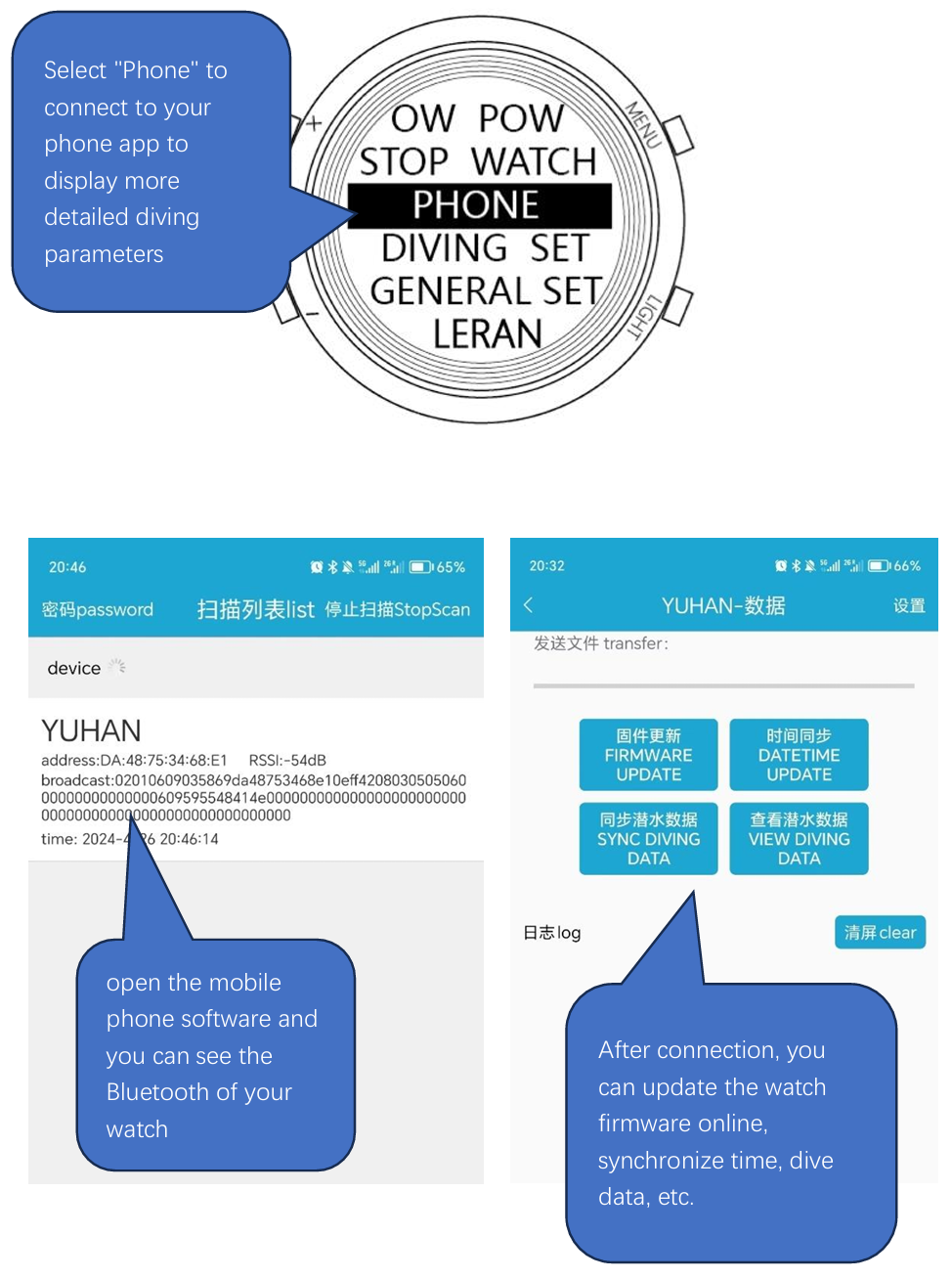
Connect to your phone:
After connecting to the phone, you can synchronize the time,
synchronize the dive data, update the firmware.
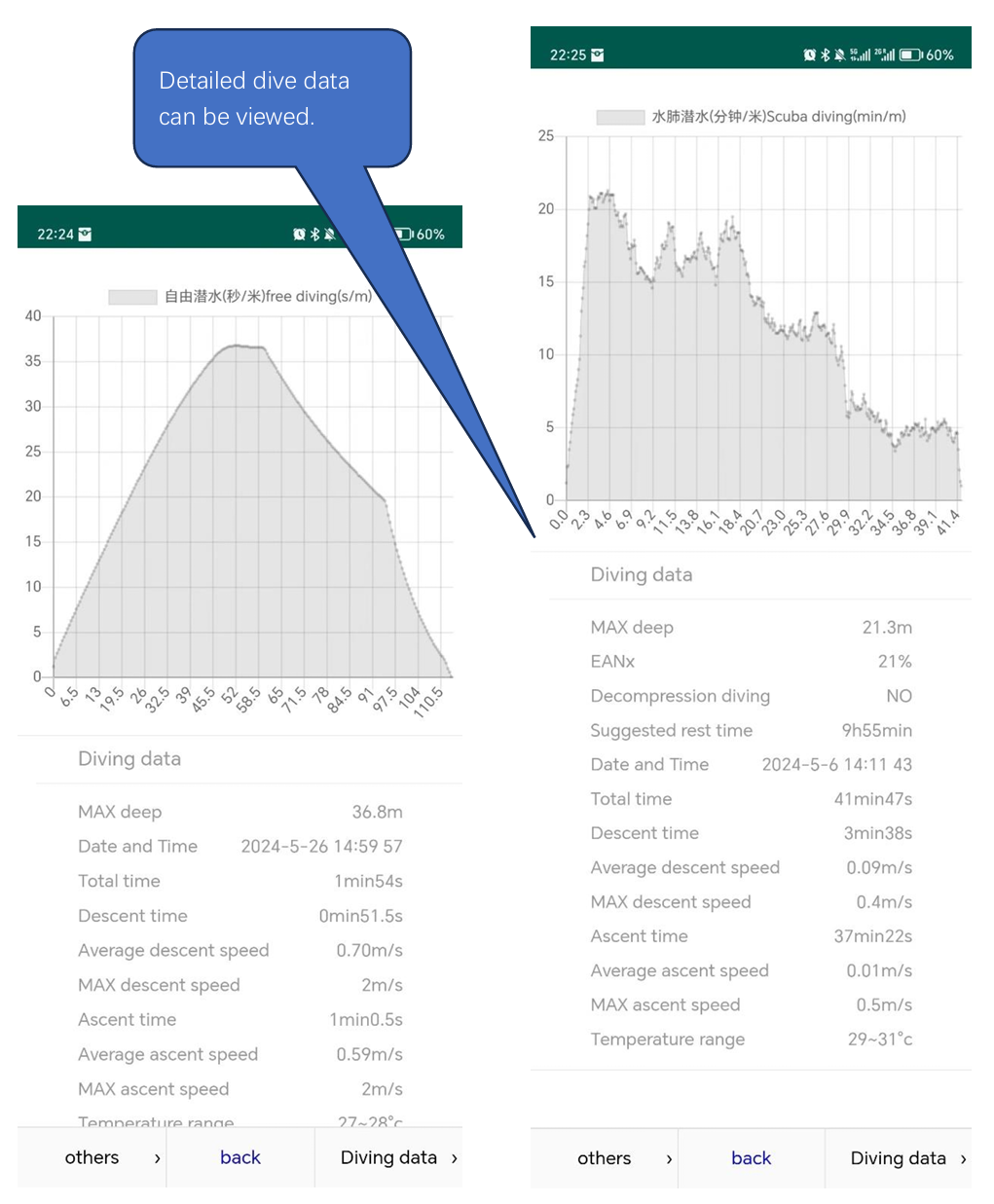
View the dive data after synchronizing the data.
4. Description of options
~~~~~~~~~~~~~~~~~~~~
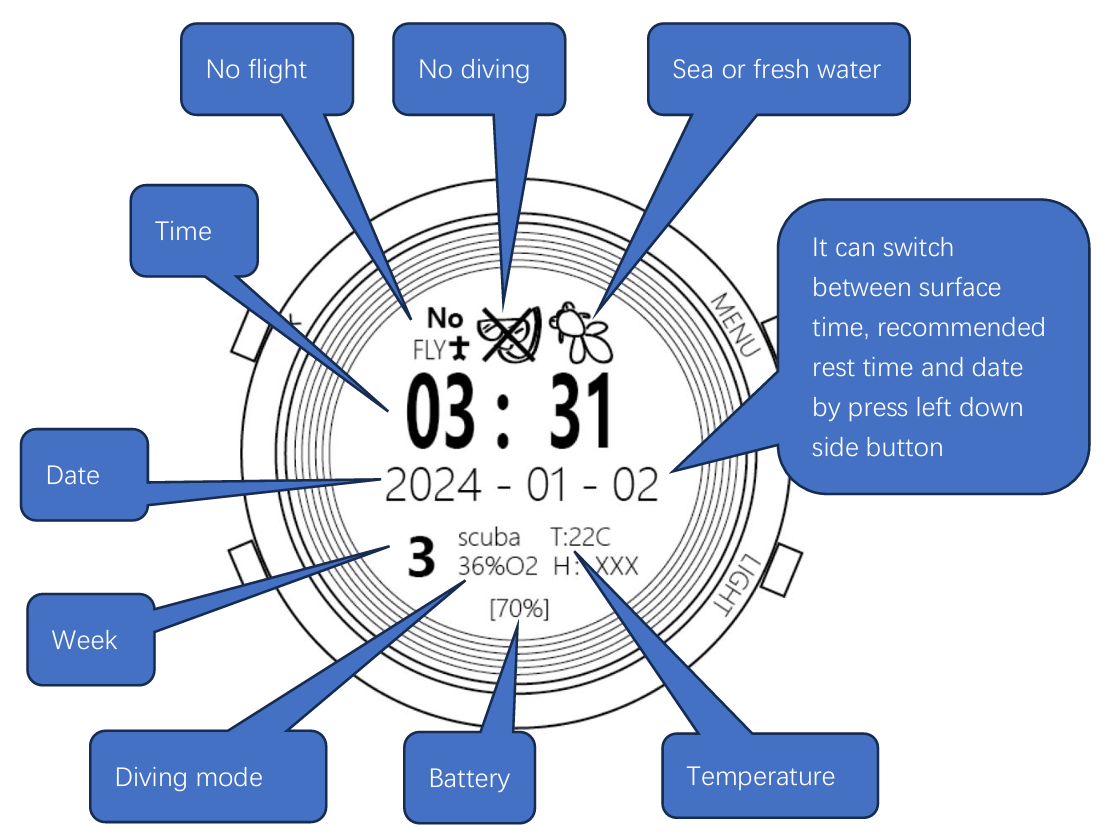
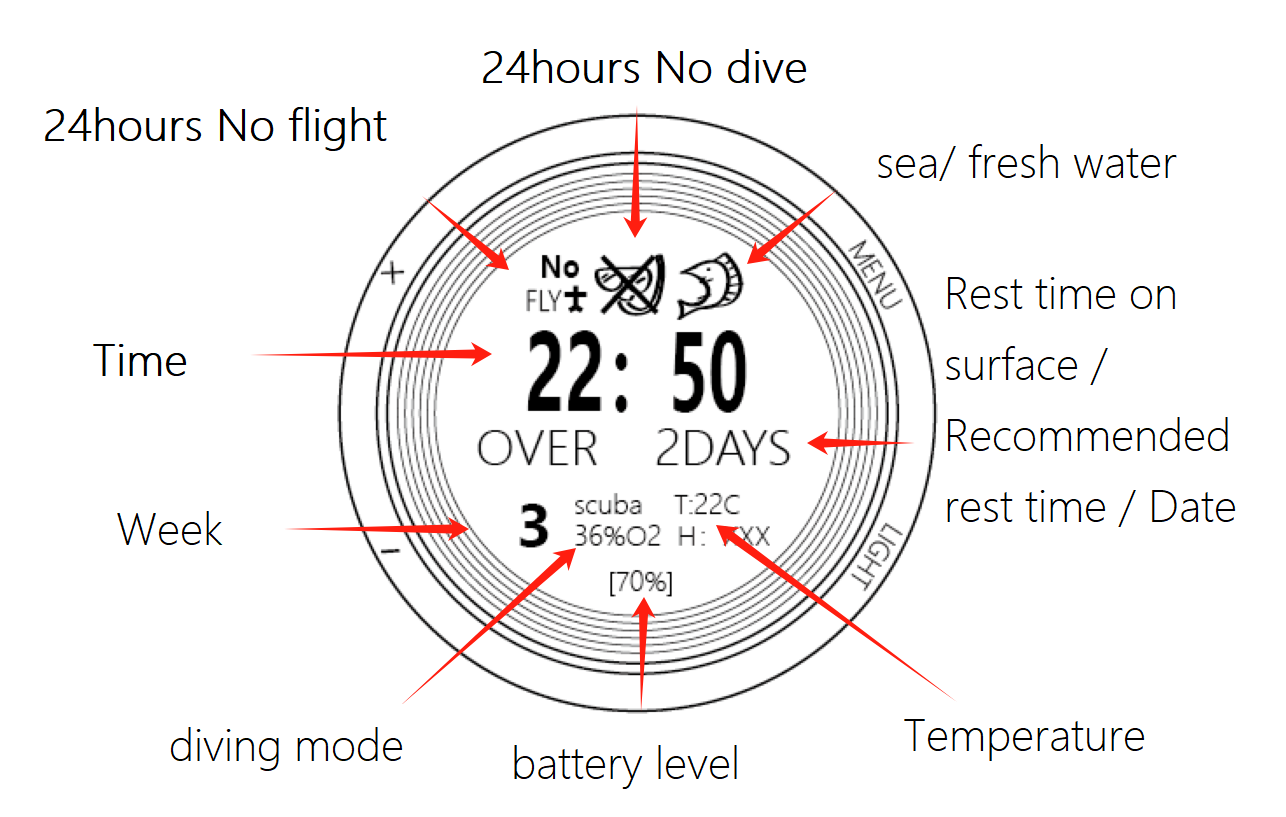
4.1 Time: show Time, date, week, display of current diving mode free/scuba, air/32%O2/36%O2, temperature T,
sea and freshwater mode, 24-hour restricted flight icon, high-risk prohibition of diving icon.
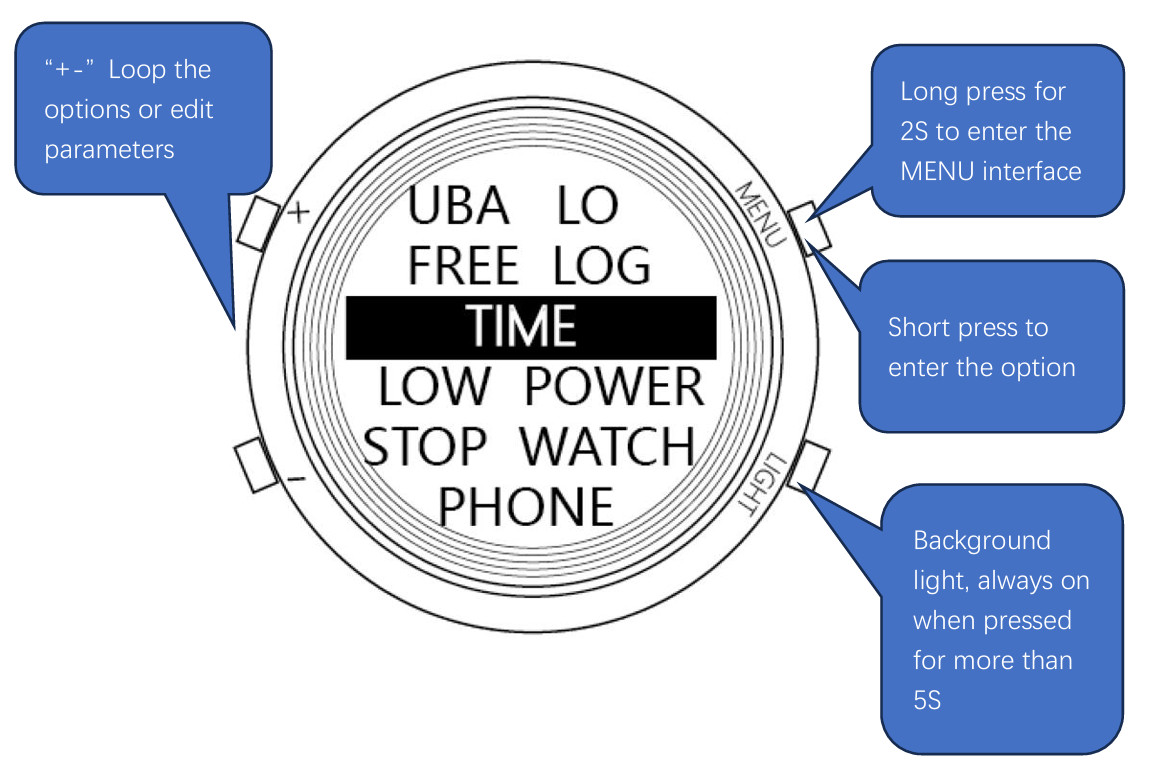
4.2 free log: View the history of free diving, displaying the maximum depth, start time, duration, temperature changes, and displaying the dive chart.
Short press menu to switch between dive data and dive chart. + runs dive data from front to back, - runs dive data from back to front.
4.3 scuba log: View the history of scuba diving, displaying the maximum depth, start time, duration, temperature changes, and displaying the dive chart.
Short press menu to switch between dive data and dive charts. + runs dive data from front to back, - runs dive data from back to front.
4.4 tolerance: used for swimming pool carbon dioxide tolerance and low oxygen tolerance training, as well as other physical training timing.
The breath holding time, breathing time, and cycle times can be adjusted, as well as the increase or decrease time for each cycle of breath holding or breathing.
Press the "Light" button to start automatic timing, with sound prompts for each cycle.
~~~~~~~~~~~~~~~~~~~~
4.5 general set: other watch-related settings.
4.5.1 time set: Set the time.
4.5.2 ble set: Set the Bluetooth name and password.
4.5.3 restore: Press menu to restore factory setting.
4.5.4 offset: Set the sensor offset to correct the sensor value.
Calibrate temperature and pressure deviation.
If the reference pressure altitude is displayed as "QNH failed" after long pressing the "+" shortcut key to correct the deviation,
you can adjust the deviation value to make the temperature equal to the current temperature
and display the pressure close to or slightly lower than the current actual pressure value.
(Temperature 250 represents 2.5 degrees, and pressure 100 represents 100 Pascal)
4.5.5 language: Switch between Chinese and English menus.
4.5.6 erase chip: Format the diving data storage module and clear all diving data.
~~~~~~~~~~~~~~~~~~~~
4.6 diving set: diving parameter setting.
4.6.1 div mode: Switch between free diving and scuba diving.
4.6.2 NITROX: Set the oxygen ratio in the nitrogen-oxygen gas for scuba diving breathing.
Compared to shortcut key adjustments, this allows for more precise adjustments, with a value range of 21% to 40%.
4.6.3 scuba gf: Set the high and low gf values for diving and the PADI mode.
The default PADI mode can be switched to the gf mode by pressing the menu button,
with 70/90 being normal and 30/70 being conservative.
4.6.4 max po2: Set the maximum allowable oxygen partial pressure to prevent hyperoxia poisoning.
If the oxygen partial pressure exceeds this value during diving,
a warning will be continuously displayed, need low speed ascend.
4.6.5 calibrate: It can be used to calibrate the depth data of the sensor,
allowing for linear calibration of the sensor's displayed depth.
QNH: current surface pressure. CAL: calibration parameter.
(Default 9800g·m/s^2 for fresh water, default 10025g·m/s^2 for seawater) QNH parameter is recommended to be recorded by long pressing the + button on the time page before entering the water.
If precise depth is not required, no special treatment is needed.
Due to the differences in altitude, water density, temperature, and the time impact on the sensor in different regions,
a more refined depth correction function is provided here to better support diving activities in different regions.
You can adjust the CAL parameter to make the displayed depth equal to the actual depth at a depth of 5m-10m,
or rely on a depth measuring instrument that is used for diving to compare the ratio between its deepest depth and the deepest depth recorded by the watch
as a parameter for calculation and calibration after diving.
The calculation formula is:
new CAL=(current CAL)*(deepest depth recorded by the watch)/(deepest depth recorded by the depth measuring instrument)
The current CAL value is displayed in the small font at the bottom of this page.
Note: Modifying the CAL value will modify the default freshwater CAL parameters.
If it is less than 9920, it will be saved as a freshwater CAL,
otherwise it will be saved as a seawater CAL.
Quickly switching between freshwater and seawater buttons will apply the latest CAL value.
If you do not want to modify it, change the value to match the number displayed at the bottom.
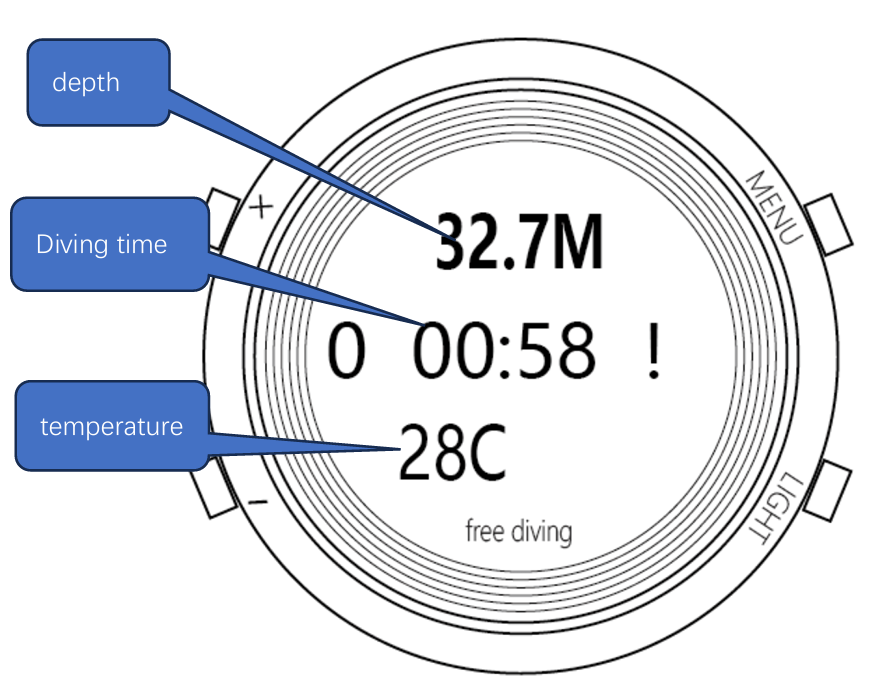
4.6.6 F caut exr: free diving ascent reminders. For free diving, you can set 4 depth reminders during ascent and a multiple gradient reminders.
"star" indicates the starting depth, and "step" indicates the step depth.
For example, if start is set to 30 meters and step is set to 5 meters,
reminders will be given at 25, 20, 15, 10, and 5 meters.
Reminders will be given at 5-meter intervals starting from 30 meters.
"F caut exr" also has a depth keeping mode "DEPTH KEEPING" for pool training. If the depth exceeds the range of two set values, a reminder will be given. Setting the two values to be the same will not trigger a reminder.
4.6.7 F cautions: free diving depth and time reminders. 5 depths, a multiple gradient reminders, and 2 time alarms can be set.
The last two data of the depth alarm are the starting depth of the gradient alarm 'star' and the alarm gradient 'step'.
It means that from the starting depth, an alarm will be triggered after every step of depth.
The maximum number of alarms is 50. The vibration or sound prompt for the depth alarm is 1S,
and the time reminder is 2S (in units of m and s).
4.6.8 s cautions:scuba diving depth and time reminders, Two depth reminders can be set.
4.6.9 sound+V: You can set the reminder mode to vibration or sound, or both. (The default is both)
4.6.10 deep stop: Two depth stays can be set, with parameters including the depth of stay and the intended duration of stay.
After the depth stay is triggered, a countdown will automatically start.
4.7 phone: You can open the mobile phone software and connect to the phone via Bluetooth.
It is used to modify the watch time, update programs, or transfer diving data.
4.8 stopwatch: stopwatch function, can record multiple data at the same time.
Press the menu button to start recording, and press it again to stop timing.
- You can cycle through the timing, and support for unlimited cycles,
but only 3 can be displayed. + Stop all timing and reset.
4.9 low power: Low power consumption mode can be entered from here or through shortcut keys.
5. diving page
~~~~~~~~Display information~~~~~~~~~
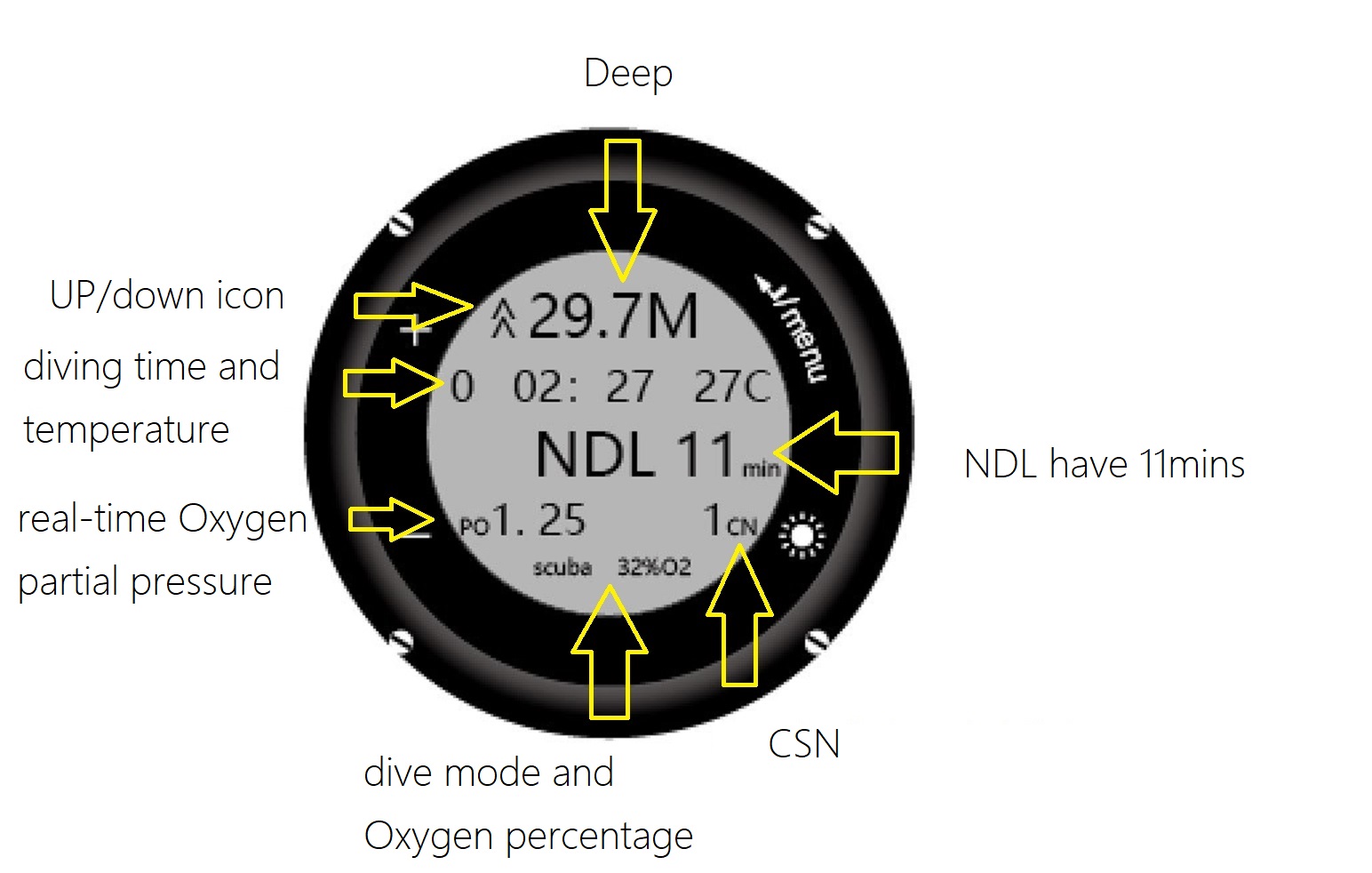
"NDL 11min":There are 11 minutes left for no decompression dive.
"2M DCO 22min":The current minimum decompression depth is 2 meters,
and 22 is the remaining decompression time,
indicating that after decompression at the current depth for 22 minutes diver can slowly rise to the surface.
"3M DCO ---min":The current minimum decompression depth is 3 meters.
At this depth, the remaining decompression time is too long to decompress,
and it may be necessary to raise the water level appropriately.
Note: The 3M here means that it cannot rise above 3 meters at present, but the closer it gets to 3 meters,
the less time it takes to decompress, but the risk of decompression sickness also increases accordingly.
If you want to ascend to water at this time, it is recommended to check the remaining decompression time during the slow ascent process.
When the time reaches to a suitable position, stop and start decompression.
If the ascent is too slow, the ascent process will also be considered as a decompression process,
and it may be possible to complete decompression during this process.
After completing decompression, the display will return to "NDL 1min",
indicating a decompression-free time.
"[[01:06]]":"5 m for 3 minutes", with 1 minute and 6 seconds remaining.
"OK [UP]": "5 m for 3 minutes" has been completed, and can raise to the surface.
~~~~~~~~Warning message~~~~~~~~~
"SPD [STOP]":When the ascent speed exceeds 12 meters per minute, it is necessary to stop the ascent.
"MSPD[DOWN]":When the depth is greater than 7 meters and the ascent speed exceeds 18 meters per minute,
it is necessary to immediately stop the ascent and reduce the depth appropriately.
"MXDP [UP]":Maximum depth of 40 m for fun dive, requiring ascent.
"TOP [DOWN]":When ascending to a depth above the minimum decompression depth during decompression diving,
it is necessary to immediately increase the depth.
"MXPO2[UP]":Upon reaching the set maximum oxygen partial pressure depth, need immediately rise.
"CNS90 [UP]":In NITROX diving inhaled too much oxygen, CSN has reached 90%, recommended to ascend.
6. Charging/long-time storage/maintenance
This computer watch uses magnetic charging, and it takes about 4 hours to fully charge.
Do not leave the watch idle for more than a month without recharging, as this can cause damage to the battery due to overdischarge.
If damaged, it needs to be returned to the manufacturer for battery replacement.
If you need to store the device for a long time, first fully charge the battery,
then set it to low power consumption mode, place it in a place where the buttons are not easily touched,
and it is recommended to recharge it in 3 months.
It is recommended to soak and rinse with fresh water after each dive and dry it.
Do not disassemble the watch cover without permission, as it will damage the waterproof structure.
~